

Home
What
Features
Download
Screen shots
Updates
Support
Prior versions
Order


Addsum TAS Premier 7i release history:
Release 18 (7ix) was published on July 31, 2024
Release 17 (7ix) was published on June 7, 2023
Release 16 (7ix) was published on July 10, 2021
Release 15 was published on October 31, 2019
Release 14 was published on April 4, 2019
Release 13 was published on June 29, 2018
Release 12 was published on November 16, 2017
Release 11 was published on December 30, 2016
Release 10 was published on October 5, 2015
Release 9 was published on April 29, 2014
Release 8 was published on April 30, 2013
Release 7 was published on October 5, 2012
Release 6 was published on March 9, 2012
Release 5 was published on October 31, 2011
(includes prior 4.2 pre-release, last updated December 8, 2011)
Release 4 was published on May 1, 2009
Release 3 was published on April 30, 2007
Release 2 was published on April 5, 2006
Release 1 for existing TAS Professional 7 users was published with the original TAS Premier 7i release
TAS Premier 7i was first published on September 21, 2005
(based on Addsum TAS Professional first published May 19, 2004)
Release 18 (7ix) was published on July 31, 2024
Release 17 (7ix) was published on June 7, 2023
Release 16 (7ix) was published on July 10, 2021
Release 15 was published on October 31, 2019
Release 14 was published on April 4, 2019
Release 13 was published on June 29, 2018
Release 12 was published on November 16, 2017
Release 11 was published on December 30, 2016
Release 10 was published on October 5, 2015
Release 9 was published on April 29, 2014
Release 8 was published on April 30, 2013
Release 7 was published on October 5, 2012
Release 6 was published on March 9, 2012
Release 5 was published on October 31, 2011
(includes prior 4.2 pre-release, last updated December 8, 2011)
Release 4 was published on May 1, 2009
Release 3 was published on April 30, 2007
Release 2 was published on April 5, 2006
Release 1 for existing TAS Professional 7 users was published with the original TAS Premier 7i release
TAS Premier 7i was first published on September 21, 2005
(based on Addsum TAS Professional first published May 19, 2004)
- TAS Premier 7i updates (listed in the order they should be installed)
-
 tp7irel1.zip (TAS Premier 7i rel. 1, 09/21/05, file size approx. 11 megs)
- (includes all updates since the rel. 1 of Addsum TAS 7 including updated documentation (except PDF, see store page for printed and PDF manual options), unzip into an existing TAS 7 installation; licensees should copy tp7runtime.exe to runtime directories)
tp7irel2.zip (TAS Premier 7i rel. 2, 04/05/06, file size approx. 7 megs)
- (assumes the user has installed tp7irel1.zip, unzip into an existing TAS 7i installation; licensees should copy tp7runtime.exe to runtime directories)
tp7irel3.zip (TAS Premier 7i rel. 3, 04/30/07, file size just under 10 megs)
- (assumes the user has previously installed the above updates, unzip into an existing TAS 7i installation; additional step: copy the provided XFR*.* files to each project folder and select the import FD's to add the FILEREL.* files to support the new file descriptor entity relationships option; licensees should copy tp7runtime.exe to runtime directories)
tp7irel4.zip (TAS Premier 7i rel. 4, updated 06/17/09, initially posted 05/01/09, file size just over 11 megs)
- (assumes the user has previously installed the above updates, unzip into an existing TAS 7i installation; licensees will need purchase the release 4 license and after receiving the updated license, then copy tp7runtime.exe and the newer license to the end user runtime directory)
- Note: two minor changes have been made to the R4 tp7runtime.exe published on 05/01/09. R4 licensees should use the tp7runtime.exe dated 06/09/09 included in the ZIP file above which also incorporates an updated digital security certificate.
tp7irel5.zip (TAS Premier 7i rel. 5, 10/31/11, last updated 12/08/11, file size approx. 16 megs)
tp7irel6.zip (TAS Premier 7i rel. 6, 03/09/12, file size approx. 16 megs)
tp7irel7.zip (TAS Premier 7i rel. 7, 10/05/12, file size approx. 17 megs)
tp7irel8.zip (TAS Premier 7i rel. 8, 04/30/13, updated 5/4/13, file size approx. 17 megs)
tp7irel9.zip (TAS Premier 7i rel. 9, 04/29/14, file size approx. 18 megs)
tp7irel10.zip (TAS Premier 7i rel. 10, 10/05/15, file size approx. 19 megs)
tp7irel11.zip (TAS Premier 7i rel. 11, 12/30/16, file size approx. 18 megs)
tp7irel12.zip (TAS Premier 7i rel. 12, 11/16/17, file size approx. 30 megs)
- (see known issues described in the release 12 information; resolution of the file lookup that can fall behind the printer dialog box will be resolved in rel. 13)
tp7irel13.zip (TAS Premier 7i rel. 13, 06/29/18, file size approx. 33 megs)
tp7irel14.zip (TAS Premier 7i rel. 14, 04/04/19 with 04/18/19 update, file size approx. 33 megs)
tp7irel15.zip (TAS Premier 7i rel. 15, 10/31/19, file size approx. 22 megs - manifest version not included)
tp7ixrel16.zip (TAS Premier 7ix rel. 16, 07/10/21, file size approx. 27 megs - manifest version not included)
tp7ixrel17.zip (TAS Premier 7ix rel. 17, 06/07/23, file size approx. 23 megs - manifest version not included)
tp7ixrel18.zip (TAS Premier 7ix rel. 18, 07/31/24, file size approx. 22 megs - manifest version not included)
- NOTE: if you attempt to access the help file and do not see any content in the right/main screen, there could be two causes. If installed on a network drive, the help file needs to be registered (click on help and choose the Register Help file option). If installed on a local drive or if previously it was working across a network drive, Windows may be blocking the file. Navigate to the folder where TAS Premier 7i is installed, locate the tp7ihelp.chm file, right click on properties and below the Advanced button on the General tab, if an "Unblock" button is present, click on that button to remove the block, and the help file's content should then be fully available.
(update discussion below is in most recent order first)
NOTE: For the complete discussion of new features, see the topic Addsum TAS Premier 7i features in the What's new in TAS Premier 7i section (click on Help then TAS 7i Help, or open the tp7ihelp.chm directly or starting with rel. 13, tp7ihelp.exe or the corresponding PDF available via the store page)
- TAS Premier 7ix release 18 information: (released on July 31, 2024)
-
- See also: TAS Premier 7ix release 18 published blog post
- New REMOVE_DIR() function.
- REGREADLOCAL() now supports REG_DWORD key types.
- New ScreenPos option tpOwnerFormCenter in connection with TEditForm which can be useful in dual monitor environments.
- When a /runprg (see running programs directly) is passed, the "Limit runtime" setting (see limiting runtime execution) if implemented in the TASPRO7.INI file is automatically set to false (because if set to true, the /runprg parameter will not be processed).
- Change to underlying VCL code with respect to TMonitor.GetBoundsRect and a call to TScreen.FindMonitor (potential issue in dual monitor environments)
- Programs that are run directly and passed with the /runprg parameter no longer load the license screen.
- Numerous message box changes to ensure messages are "on top" when internal errors occur with respect to the TTASDataGrid object.
- When installing the runtime or development system programs into a folder (or path name) with one or more space characters (more specifically, when the DataDictPath in TASPRO7.INI references a path name with a space character), this would cause problems both in loading the report designer from the development system as well as when calling that EXEC_RB function from the runtime executable. This has been resolved.
- Ongoing improvements to the Maintain Database program (mainly relating to editing array fields).
- Adding "Zen" to some of the messages that have referenced "Pervasive."
- Documentation added with respect to known issues with respect to Terminal Server environments involving default printers and redirected printers.
- The Addsum Btrieve 6.15 setup (which is not technically a part of the development system; see Addsum Btrieve 6.15 setup utility) has been updated.
- See also: TAS Premier 7ix release 18 published blog post
- TAS Premier 7ix release 17 information: (released on June 7, 2023)
-
- See also: TAS Premier 7ix release 17 published blog post
- New COPYTOCLIPBOARD() function.
- New third paramenter in SENDKEYS() allowing you to target an external window/application.
- Documentation outlining how to use colors in RUN programs.
- RTOD() function documented
- TRANSX improved to allow for concurrent, rather than exclusive, file access, some improved error response and updated documentation.
- Ask button default behavior changed
- Ability to upload files using secure/encrypted protocols using newly provided external executable
- Reenabling FASTMM4 memory manager which resolves issues with TLLFC() function in Windows 10/11 environments.
- Exception handling added in TLLFC() function.
- Other documentation updates (PDF is now 811 pages).
- See also: TAS Premier 7ix release 17 published blog post
- TAS Premier 7ix release 16 information: (released on July 10, 2021)
-
- See also: TAS Premier 7ix release 16 published blog post
- New QRCODE() function that can create QR code images (and which then be included in reports as with any image file).
- New EXPORTGRID() function that can output the currently visible rows of a TTASDataGrid to a number of formats including XLSX.
- Two new utilities for general development use which can also be used in end user runtime situations include Read XLS/XLSX and Load Delimited Text to Grid.
- The Export File option now uses the new Load Delimited Text to Grid executable when a comma or tab delimited file is chosen.
- The EXPORT command fixed with respect to non-comma delimited files
- The Export File/Quick Report option was being limited to the old file name length limit.
- Maintain Data Dictionary error handling improved
- Additional TASPRO7.INI information in the event it cannot be founded when launching the report designer.
- FastMM4 memory manager removed.
- Make Default feature added to TP7EXECUTE.EXE.
- New end user help file added to the report designer.
- Objects with change events better documented; significant additions to documentation and three new sample programs.

- See also: TAS Premier 7ix release 16 published blog post
- TAS Premier 7i release 15 information: (released on October 31, 2019)
-
- See also: TAS Premier 7i release 15 published blog post
- New CBDELETED() function returns the total number of deleted records in a CodeBase file.
- Maintain Database program been enhanced to take advantage of the new CBDELETED() function and has a new panel and button near the bottom in the event a CodeBase file is opened. Maintain Database program also enahanced to, for the first time, properly find numeric or data values use as keys in CodeBase files
- OPEN_FILE_NAME() now returns the actual DBF file extension for CodeBase files preceded by the FILELOC path.
- GET_FILE_TYPE() was internally being referenced as FILE_TYPE, inconsistent with the documentation and the cmdtree file; fixed.
- EXEC_RB() function can now accept an RTM file as a parameter and will, if sent, automatically load/open it in the report designer.
- Globally Change utility enhanced to make it more intuitive to use and following the enhancement made to this option in r14
- FD differences utility enhanced
- MRU (most recently used) options renabled and the prior limit of 10 increased to 20 (includes opening programs, screen, running programs from the development system and opening report layouts)
- Btrieve/PSQL and CodeBase reindex programs have been reviewed and updated (mainly cosmetic plus digital signature updates)
- Issue introduced in r14 when clicking on File and then Exit with both an open screen and open program leading to an application fault has been resolved
- Additional 10 pages of documentation (PDF is now up to 780 pages)
- See also: TAS Premier 7i release 15 published blog post
- TAS Premier 7i release 14 information: (released on April 4, 2019)
-
- See also: TAS Premier 7i release 14 published blog post
- CodeBase FLERR() return when a record is not found made consistent with the error/status code returned when accessing a Btrieve file
- REGREADLOCAL() function documentation fixed; issue of extra/stray characters sometimes being returned by this function has been fixed
- Report designer's DisplayFormat option (right click on report objects) now is available; format template examples are also now displayed in the list box
- Standalone licensed runtime no longer tries to update the TASPRO7.INI file when exiting
- Maintain Defined Fields has been fixed/enhanced
- Encrypt File now "remembers" the last file encrypted and encryption phase used in a given session and immediately closes when successful without a confirmation dialog
- TP7EXECUTE.EXE has been significantly enhanced with new options
- The Globally Change utility (Change/Delete Records) enhanced to provide record locking support plus the ability to specify keys and ranges allowing for vastly improved data maintenance performance
- The main screen of the development system could sometimes be internally re-positioned off screen; this should no longer occur
- Command Tree check box in the program editor now defaults unchecked
- Additional documentation added throughout
- See also: TAS Premier 7i release 14 published blog post
- TAS Premier 7i release 13 information: (released on June 29, 2018)
-
- See also: TAS Premier 7i rel. 13 blog post
- Runtime engine updated to include the some compiler directives that may help users who start to experience network connectivity issues
- Problem of the lookup button falling behind the printer dialog box (associated with a PRINT_REPORT command) has been resolved and supports more modern open dialog interfaces
- The last "Type" selection chosen when printing to a file (via PRINT_REPORT) is now automatically "remembered" by the runtime engine in each runtime session and becomes the new default
- New function ISODateTime() which returns ISO format 8601 date/time, date or time values
- New function FILES_TOPEN() which returns the total number of files currently opened by OPENV or OPEN in a runtime instance
- New function EXEC_TOP_WAIT() which calls an external executable and attempts to make it "topmost" and has the ability to wait before relinquishing control to the calling program
- Improved OPENV command with documentation clarification (expanded from 255 to 999 files opened per runtime instance)
- LAST_FILE() fixed in that it was previously always returning zero, now returns the same value as the new FILES_TOPEN() function
- GET_FILE() has a new 5th parameter so that it can be used as a "Save as" as well as "Open As." Also, sending a blank default path to GET_FILE() results in the last path chosen by user. Extended file open dialog now also supported (operating system dependent).
- GET_RUN_PRG() will now load topmost automatically and provides extended file open dialog support.
- WHELP (as well as F1 form key presses) attempts to load CHM files topmost.
- EXEC_RB() now attempts to load the report designer executable topmost
- New development system help options and new reimplemented HLP support option for newer operating systems:
- Maintain database, file initialization and TAS merge enhancements
- See also: TAS Premier 7i rel. 13 blog post
- TAS Premier 7i release 12 information: (released on November 16, 2017)
-
- Graphic form minimization to task bar and related changes. For more information see: Minimize to taskbar and WinForm changes with TAS Premier r12
- New function: SETWINDOWPOS()
- Manifest enabled runtime and Win 10 detection
- EMAIL() function now supports "ReplyTo"
- Report designer now supports a Page Style band
- Enhancements to maintain database and six other utilities
- Documentation updates and additions
Known issues: as described in the documentation, there are potential issues with certain commands or functions that internally rely on wrappers around Windows API calls relating to the implemention of extended form styles, required to solve other issues. One of those functions is GET_FILE(). While workarounds for those are available through occasional programmatic use of SETWINDOWPOS(), a "save as" file call that can lead to a file lookup falling behind the print dialog box (when printing to a file) will require a future update to resolve.
- TAS Premier 7i release 11 information: (released on December 30, 2016)
-
- See also: TAS Premier 7i rel. 11 new features
- Full TListBox object support
- Enhancements to GET_OBJ_PROP() and OPEN()
- New functions: IsRemoteSession(), STOD(), TickCount(), LastTickCount(), ResetLastTickCount() and related internal message tracking for key and button presses
- Runtime loading behavior enhancements
- Demo behavior enhancements (including expansion of 100 record limitation to 2000)
- Quick reports page break output issue resolved
- Maintain database enhancements (file location override, navigation and editing enhancements)
- Data dictionary file list and FD layout reports have been enhanced and improved.
- Documentation and internal message updates, and overall memory management improvements
- Two new sample programs demonstrating some of the capabilities of TListBox and the new tick count related functions

- See also: TAS Premier 7i rel. 11 new features
- TAS Premier 7i release 10 information: (released on October 5, 2015)
-
- Improved handling if DFM/DCY, RTM/RCY are not present or become unavailable
- Improved handling if an RWN program chained to by another RWN is not present or becomes unavailable
- Improved handling in the event a program is run with fields that are associated with a file not properly opened programmatically or if the file becomes unavailable for whatever reason
- Improved handling in the event a "key setup" error is encountered.
- Enhancements to the development system include how the program initially loads, dictionary lookup form and column resizing, better fast search handling when selecting a type V field, fix for the while option added to the export option in r9
- Data grid/wlistf improved handling when deleting the first visible record in a grid
- Occasional issue of black or blank/missing images attached to reports (whether on the fly or pre-attached) resolved
- Printer list in print dialog box always refreshed in the event of of lost network connections
- Report emulation text files replaces text option in print to file drop down and can also be created programmatically
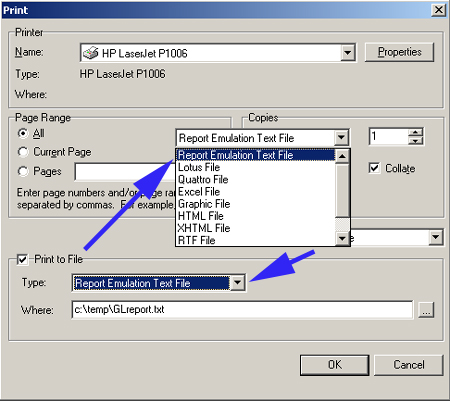
- New PRINT_TEXT function
- Report archive file support which can be created programmatically via enhancement to the PRINT_REPORT command and which can be previewed/printed via the new PRINT_ARCHIVE function
- New GET_PAGECOUNT() function.
- Report designer enhancements with respect to loading the help file, not starting as maximized, improved dictionary lookup support for form and column resizing, new bottom/left default margins
- TAS Premier 7i release 9 information: (released on April 29, 2014)
-
- Smarter form loading if files not found where expected
- CTRL-O-U and CTRL-O-J restored in source editor
- New checkbox report designer options and calc object
- Old style printing automatically set to bold:
- Generic export option improved
- Initialization program contains option to not update the location path when initializing a file
- Documentation enhancements
- TAS Premier 7i release 8 information: (released on April 30, 2013)
-
- Help system changed throughout to support the newer CHM standard (HLP format is still supported)
- New INI option to globally specify a help file
- WHELP command fully supports both HLP and CHM files
- The command/function tree list in the right hand portion of the program editor now fully links to the help file (right click)
- Maintain separate setting (INI) files per user and set runtime configuration program enhancements allowing for using sizes larger than 96 dpi in legacy programs
- Tp7rtsetup.exe shows current logged in session information and DPI settings and other enhancements
- Hide main form option(new INI setting)
- New functions include: READREGLOCAL(), GET_WINSCRN_RES(), HIDEAPPBTN(), SHOWAPPBTN(), HIDETASKBAR() and SHOWTASKBAR()
- Border icons associated with the TEditForm object are now supported in the SET_OBJECT command
- PERVASIVE_SERVER() function enhancements
- Font size can be changed on the fly in the program source code editor
- Monitor handling enhancements particularly in remote control situations and also for dual monitors and idle time events
- Improved internal scaling for both TEditForm and RUN style forms; RUN style forms can now be made to work with large-sized fonts .
- Legacy RUN programs now minimize to the taskbar rather than at the lower left portion of the desktop.
- Improved exception handling with respect to date values
- Export file option enhanced to contain features similar to the quick report option, i.e. the ability to enter a range of values based on the chosen index, and to start the export on the keyed value
- TAS Premier 7i release 7 information: (released on October 5, 2012)
-
- Significantly enhanced EXPORT and IMPORT commands
- The FTP function now supports ASCII transfer types and multiple file "gets" (ftpMget)
- The SET option of the Date and Time commands are for the first time supported (since TAS 5.1)
- New BTRIEVE_VERSION() function returns the major and minor Btrieve/Pervasive client requester version in use
- New LOCK_OWNER() function returns the client name or IP address associated with the last user that locked/blocked a record (Pervasive 2000i and higher; causes no problems if used in a Btrieve 6.15 environment)
- New PERVASIVE_SERVER() function returns the name of the Pervasive server or gateway (Pervasive 2000i and higher)
- New GET_SERVER_DATETIME() function combines two prior functions first released in rel. 4 but now significantly changed to return the server's date/time stamp in one call
- New LOAD_FORM_TOP command allows you to load a form from an existing loaded form that will become the topmost active form on the end user's desktop
- Significant changes and enhancements to the end user configuration program Tp7rtsetup.exe as well as to the development user configuration program Tp7setup.exe
- Report writer changes to improve the startup form and other enhancments
- Some of the newer functions added in prior releases were not being highlighted in the program editor and this has been resolved
- Updated command tree view list
- Document updates include a new section for TppDBMemo that was previously missing, and enhancing the existing documentation for the related TppMemo and updates to many other sections such as the Record Number Get/Set topic
- Internal changes to maintain how Btrieve memos work and memory issues relating to the use of chain newruntime with RUN programs that changed in rel. 6 to improve memory handling
- Improvements to how Btrieve/Pervasive is loaded
- Maintain database updated to provide internal support for returning the LOCK_OWNER() information in the event a record is locked while editing
- TAS Premier 7i release 6 information: (released on March 9, 2012)
-
- Note: For the full discussion of new features, see the Addsum TAS Premier 7i section in the documentation.
- Automatic detection/correction of registry pathing conflicts on startup (runtime engine)
- Reimplementation of MEM() function and new GET_PROGCOUNT() function
- SERIAL_PORT() internal close changes and exception handling, and documentation for handling in Windows 7 USB-serial port cable and Remote Desktop Connection environments
- Ongoing memory changes and enhancements resulting
- AutoScroll property default is now false when creating new screens (forms)
- Set configuration program and other program forms optimized to better accommodate Windows 7 default DPI settings
- E-mail send operation now automatically detects HTML markup codes (see documentation for further information and limitations); improvements to e-mail content header identification
- Note: For the full discussion of new features, see the Addsum TAS Premier 7i section in the documentation.
- TAS Premier 7i release 5 information: (initial pre-release 4.2 10/8/09, released on October 31, 2011, last updated December 8, 2011)
-
- Note: For the full set of new features, see the Addsum TAS Premier 7i section in the documentation.
- Internal memory handling enhanced (10 fold increase to internal temporary memory to help prevent out of memory errors in complex arrays)
- Launch tp7runtime.exe multiple times from desktop (no longer limited to one initial launch per folder)
- Related to the above, limit runtime execution to emulate pre-release 5 behavior
- Run a starting program with a parameter
- The List/Screen/Printer/Disk dialog box form in legacy programs was not by default being fully displayed
- Form size adjustments made to several of the reindex and setup EXE's, and several of these were not previosly digitally signed; all updated
- New GET_WEBSOURCE() function
- A problem with the generic import option has been resolved
- Various maintain data dictionary enhancements including the ability to re-size rows, new fixed field name column allowing for the ability to move field names to a different position, new key name numbered column to show the index numbers (which can be used in code as opposed to the key name) and which provides the ability to move the key name.
- TAS merge and file initialization options improved
- Global change/delete and quick report enhancements
- Import/export program file name length changes
- Legacy NMENU command change
- File creation options (creating DLL's and Icons) path changes to use the application path rather than trying to create any DLL or files elsewhere (previously some files were being created in the Windows directory which potentially could create permission and other issues with Vista, Windows 7, etc.)
- A new RESTART_RUNTIME() function is now available for special circumstances.
- Various internal maintenance release updates, internal debugging options, MySQL query documentation
- Extensive documentation updates
- All TAS Premier 7i related executables are compressed to optimize file size as well as digitally signed (publisher name: Addsum Business Software, Inc.)
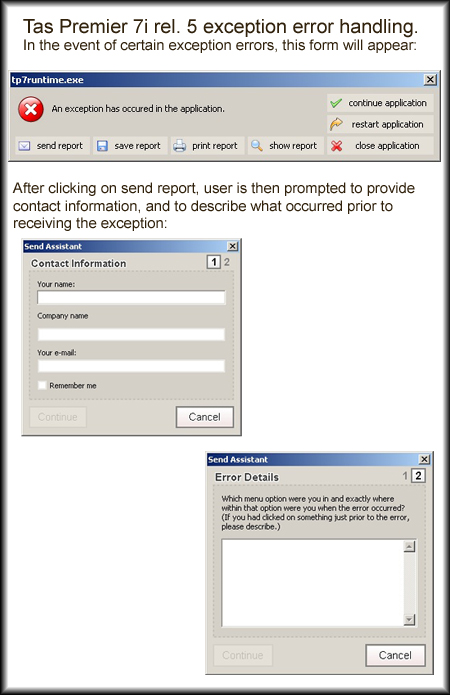
- New exception reporting options (in addition to send report: save report, show report, print report) plus addition of contact and error description screens when sending a report). Added 11/17/2011. An example of the series of
forms that a user would see when sending a report follows:
- Note: For the full set of new features, see the Addsum TAS Premier 7i section in the documentation.
- TAS Premier 7i release 4 information: (includes enhancements through March 2009, released 05/01/09)
-
- TAS Premier 7i has been consistently developed since the prior release and while we have many features "in progress," it is at last time to publish a release. This release will involve an update cost and a newer license for runtime licensees. The development system remains free of charge. Consistent with our policy, enhancements are rigorously tested before official release, which is part of the reason why a release has not been made earlier.
- There are many new commands, full featured file transport protocol (FTP) functionality (this single new first ever feature will for many developers be worth the update alone), an FTPTRACE command, and a new GET_IP function (these were added a year ago and have been in continuous use at pre-release sites ever since). A new browser object was also added last year and is included in this release.
- New pathing and server functions include a get UNC path function and get server time and date functions.
- An invaluable e-mail trace has been added; SMTP ports can now be any valid port and are not restricted to port 25.
- Triple-DES cipher options have been added.
- For the first time, the language has a send keys function.
- A long existing active microKernel users issue that has existed in all prior versions including the earliest releases by Business Tools, Inc. is resolved by this release. A new active microkernel user session was created every time a TAS program was run and could result in hundreds of seemingly temporarily stranded sessions with no file handles, greatly confounding the management of Pervasive systems (fortunately this has never created a licensing problem). As a result of this significant change, some improved performance may also result. Systems with this update have been successfully running for well over a year.
- Enhancement to the exception error handling of the SERIAL_PORT() function plus a new flush buffers option, which has been in commercial use since November of 2008.
- Improved exception handling of masked edits and improvements when chaining.
- New Import File/Globally Change options for simple file importing and new global change/delete records utility never previously available in the TAS development tool.
- TP7SETUP.EXE and TP7RTSETUP.EXE enchancements.
- Maintain Database program enhancements and initialization improvements.
- EXE's are now are all digitally signed.
- A further enhanced/optimized DDF creator that matches Pervasive standards and optimizes tables for read/write access is available, in addition to a new Addsum SQL Query Tester tool for developers working with ODBC.
- Many other enhancements have been made during the last half of 2007 and especially throughout 2008, which is the main focus of this release.
- TAS Premier 7i has been consistently developed since the prior release and while we have many features "in progress," it is at last time to publish a release. This release will involve an update cost and a newer license for runtime licensees. The development system remains free of charge. Consistent with our policy, enhancements are rigorously tested before official release, which is part of the reason why a release has not been made earlier.
- TAS Premier 7i release 3 information: (April 2007)
-
- This release brings 32-bit TAS programming development to the next level of sophistication and maturity, with many improved core menu options and the integration of various legacy utilities, plus the introduction of several utilities never previously available.
- Six new commands/functions and expanded DLL character option functionality
- Reports now have full text searching capability in preview mode
- New FD differences utility, the first 32-bit version and completely re-written and more accurate than its predecessor legacy version
- File descriptor entity relationships option: the first true relationships management option in the TAS language, uses legacy file names, but completely re-designed, new documentation concerning database design
- Extensive enhancements to maintain database and maintain data dictionary
- New Check File Integrity utility never previously available
- Integration of legacy export and quick report options; "smart" quick report option for the first time uses indexed searching methods producing faster report queries
- The Pervasive/Btrieve reindex program has significantly improved recovery and other features
- Much more: see the topic "Addsum TAS Premier 7i features" under "What's New in TAS Premier 7i" towards the beginning of the help file for detailed information
- This release brings 32-bit TAS programming development to the next level of sophistication and maturity, with many improved core menu options and the integration of various legacy utilities, plus the introduction of several utilities never previously available.
- TAS Premier 7i release 2 information: (April 2006)
-
- DB RTF object now functional
- RTF files can now for the first time be included dynamically in a report
- Potential pathing problems resolved
- A pathing issue first resolved by rel. 2 of Addsum TAS Premier 7i (some nine other commands have also been updated)
- Prior to this release and in all prior and other versions of TAS 6 and 7 ever released including TP5WDBA and other legacy EXE's, if a user clicked on the file browse button when printing to a file and selected a different directory path, then subsequent attempts to run TAS programs (from, for example, a main menu program) failed
- Screen/program editors
- Changes have been made to help reduce the chance of a redraw error
- Image dialogs enhanced
- Additional/extended types were not being shown as being available for selection; these additional types are now shown
- Other changes
- Various changes have been made to improve speed and memory handling and in connection with a number of commands
- Updated/enhanced documentation
- Pervasive/Btrieve reindex program improved
- Updated/enhanced documentation
- DB RTF object now functional
- TAS Premier 7i release 1 information: (September 2005)
-
- New Code Template Editor for use with the Program Editor
- New chart objects (pie, bar and line) and related functionality includes four new chart functions and related new objects
- New "direct open" options for opening source and screens without having to use the Windows open file dialog
- Three new date math functions
- New PAUSE command
- The READ (SpRead) option of the SERIAL_PORT function works (not previously supported in ANY prior release of TAS 6 or 7)
- COPIES option in PRINT_REPORT fixed
- Tested with, and support added, for Pervasive V9
- New function that allows a developer/licensee to invoke the report designer from the runtime environment
- Compiler enhancement relating to #FORCERWN
- Program Editor enhancements relating to the highlighting of structured commands
- New "direct open" options for opening source files and screens
- New Build and Execute button options
- RUN/legacy enhancements including fix for the trap ESC and trap INT and handling of the system close button
- New hash function
- New button events
- Fields no longer required to trigger events
- New Code Template Editor for use with the Program Editor
- TAS 7 release 3 information: (January 2005 - these are included in TAS Premier)
-
- New Zip/Unzip functionality built directly within the language (first version of TAS to provide this ability)
- New compiler options: (1) display final specs, (2) display errors only and (3) save error files (determines what information is displayed upon compiling a program and whether to save error files to disk). These options are particularly useful when compiling multiple programs at once.
- New DIR_EXISTS() function to check the existence of a directory
- Extensive ongoing improvements/enhancements to the documentation
- Enhancements to the encryption functionality
- New Data file analysis option
- More enhancements to the maintain database program
- Demo license capability (for existing unlimited runtime developers)
- EQU_MID legacy command fixed and documented
- New Zip/Unzip functionality built directly within the language (first version of TAS to provide this ability)
- TAS 7 release 2 information: (included in TAS Premier 7i)
-
- The major features included are listed below; many other internal enhancements have been made that are not necessarily listed here.
- Since the initial release of TAS 7 which included support for JPG/JPEG, GIF and PNG images in both the screen and report editors, support for the following image types have been added (first time ever in any version of TAS):
- Tiff Images (*.tif, *.tiff)
- GFI Fax Images (*.fax)
- SGI Images (*.bw,*.rgb,*.rgba,*.sgi)
- Autodesk Image Files (*.cel,*.pic)
- Truevision Images (*.tga, *.vst, *.icb, *.vda, *.win)
- ZSoft Paintbrush Images (*.pcx,*.pcc)
- Word 5.x Screen Capture Files (*.scr)
- Kodak Photo-CD images (*.pcd)
- Portable pixel/gray map images (*.ppm,*.pgm,*.pbm)
- Dr. Halo images (*.cut, *.pal)
- SGI Wavefront images (*.rla, *.rpf)
- Photoshop images (*.psd, *.pdd)
- Paintshop Pro images (*.psp)
- The "Source attached" property of a TTASFORM as well as COMPILE_SRC fixed.
- Graphical images (all types) can be accessed dynamically on reports (first time ever in any version of TAS).
- An issue relating to chain with the newruntime has been resolved.
- New shortcuts added.
- Serial port "write" fixed.
- E-mail functions fixed.
- Application title (taskbar) and initial caption (if no main menu program) can be specified in the INI file (applies to user distribution licensees only)
- Enhancements to maintain database, maintain dictionary and maintain file location options.
- Ability to turn off XP theme support (typically for systems using RUN style program options).
- Component palette remembers last position.
- Additions to documentation, additional sample programs.
- The major features included are listed below; many other internal enhancements have been made that are not necessarily listed here.
-
Addsum TAS Professional 7 was initially released on May 19, 2004.